Part-Whole Model Worksheet/Game
Related Pages
Printable Math Worksheets
Online Math Quizzes
Math Games
Math Worksheets
This Part-Whole Model Worksheet/Game is a great way to put your skills to the test in a fun environment. By practicing, you’ll start to work out the answers efficiently.
Part-Whole Model Worksheet/Game
Welcome to Part-Whole Model Worksheet/Game. This game helps you understand how two smaller numbers (the parts) come together to make one bigger number (the whole). It uses a “Part-Part-Whole” model to help you master addition and subtraction. You need to find either the whole or a part. Scroll down the page for a more detailed explanation.
How to play the Part-Whole Model Worksheet/Game
-
Choose Your Mission
When you first start, you’ll see three buttons on the Mission Control screen:
Find the Whole: You see the two small “Part” circles at the bottom. You must add them together to find the big number at the top.
Find a Part: You see the big “Whole” circle and only one small “Part.” You must figure out what number is missing from the other small circle.
Mixed Practice: The computer will surprise you by switching between finding the Whole and finding a Part. -
How the Diagram Works
The Yellow Circle (The Whole): This is the “Whole.” It is the total number that the two bottom circles must add up to.
The Blue Circles (The Parts): These are the two smaller numbers. When they travel up the straight lines and join together, they create the Whole.
The “?” (The Target): Look for the circle with the question mark. This is the number you need to find. -
How to Play
Read the Bond: Look at the numbers provided.
If finding the Whole: “I have a 3 and a 2. What do they make together?"
If finding a Part: “I have a 10 at the top and a 7 at the bottom. 7 plus what makes 10?"
Select an Answer: At the bottom of the screen, you will see four blue number cards. Tap the one you think is the correct answer.
Check Your Work:
Correct: The circle will fill in with your number and glow green. The computer will read the math sentence to you (e.g., “4 and 2 make 6”).
Incorrect: The card will fade out. Just count again and try a different number.
After a short pause to let you see the completed bond, a new mission will start automatically.
If you want to change your mission, just tap the small “Back to Menu” button at the very top of the screen to return to Mission Control.
Tips
Use Your Fingers: If the “Whole” is 5 and you see a “2,” hold up 5 fingers, put down 2, and count how many are left.
Listen Closely: The game has a built-in voice that will tell you the numbers and help you if you get stuck.
Try Again: If you pick the wrong number, that card will fade out so you can try a different one.
Part-Whole Model
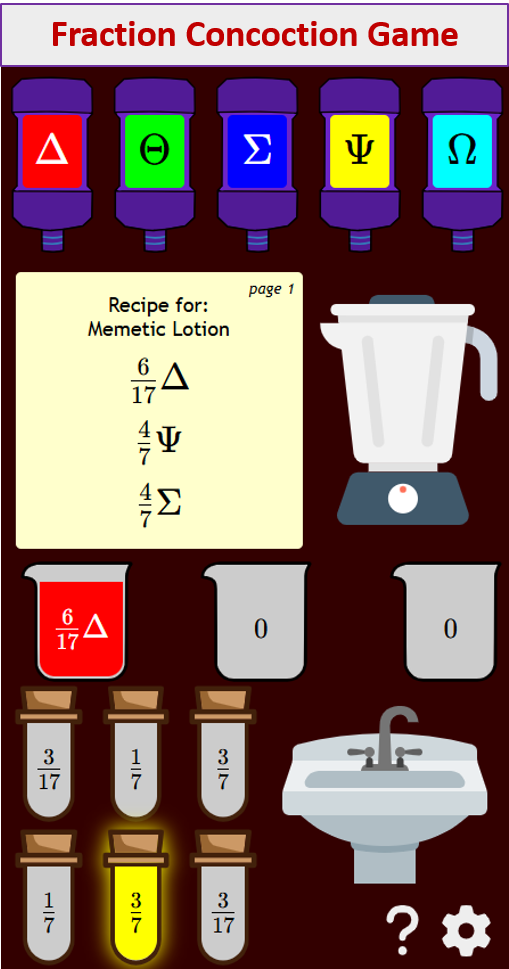
Try out our new and fun Fraction Concoction Game.
Add and subtract fractions to make exciting fraction concoctions following a recipe. There are four levels of difficulty: Easy, medium, hard and insane. Practice the basics of fraction addition and subtraction or challenge yourself with the insane level.
We welcome your feedback, comments and questions about this site or page. Please submit your feedback or enquiries via our Feedback page.